
Creating polished images, short videos, and original audio once meant juggling several creative apps. Pixazo AI brings those workflows together in a browser-based platform, giving creators access to image generators, editing tools, video models, music tools, and developer APIs. But does its convenience justify the cost?
In this Pixazo AI review for 2026, we examine its tools, practical use cases, published pricing, commercial-use rules, and limitations. The assessment is based on official published information rather than claimed hands-on testing.
What Is Pixazo AI?
Pixazo is an AI creative platform operated by Appy Pie LLP. Its website brings together tools for generating and editing images, producing videos, creating music and voice content, and working with AI models through an API.
One of its main selling points is choice. Instead of relying on a single image or video engine, the platform offers access to multiple models and specialized workflows. Pixazo's homepage advertises 600+ models and a selection of creator-focused tools; catalog counts can change as new models arrive.

What Can You Make With Pixazo?
1. Generate Images From Text Prompts
Describe an image and select a model that suits the result you want. Pixazo offers image-generation options for product-style imagery, posters, thumbnails, illustrations, and creative concepts. It lists models from providers such as OpenAI, Google, and Black Forest Labs, although individual model names and availability may change.
For example, an online seller might start with: "A ceramic coffee mug on an oak desk beside a notebook, soft morning window light, realistic product photography, square composition." Generate several versions, inspect the details, and select the strongest result.
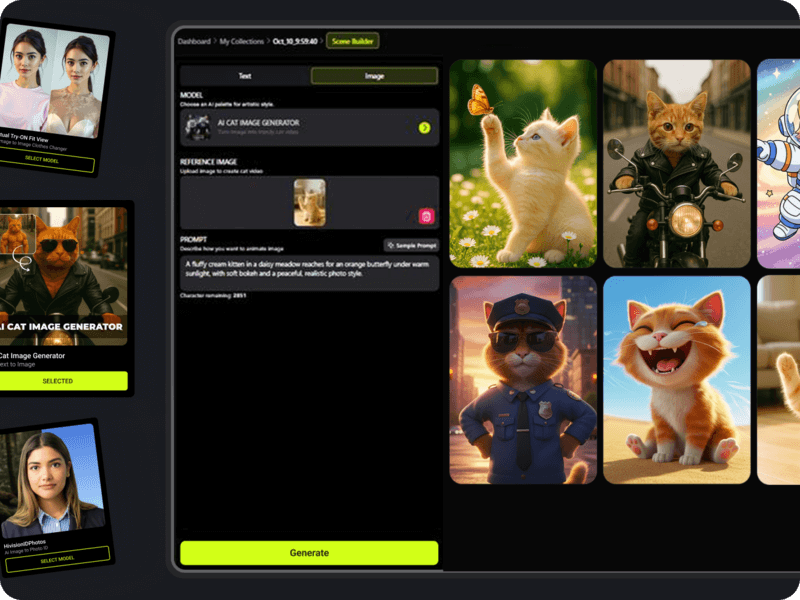
Keep expectations realistic: AI image generators may struggle with precise logos, small text, facial details, repeated characters, and exact product specifications. Review every output before using it commercially.
2. Edit and Enhance Existing Photos
Pixazo also offers image-editing workflows, including inpainting, background removal, and enhancement tools. These can help clean up a distracting background, experiment with a new composition, or prepare a visual for a campaign.

For business use, inspect object edges, shadows, reflections, and image authenticity. Generative edits are useful for concepts and marketing visuals but should not be misrepresented as documentary photographs.
3. Create AI Videos and Animate Still Images
Pixazo's video tools support text-to-video and image-to-video workflows. Users can describe motion, camera movement, and lighting, or start with a still image that establishes the scene. Available models and output quality depend on the selected engine and plan.
- Social content: Experiment with short clips for vertical videos and promotional posts.
- Product concepts: Animate a static product scene with a slow camera movement.
- Storyboarding: Explore a sequence visually before investing in a full production.
Video is often more credit-intensive than still-image generation. Check the displayed generation cost before submitting a project, especially for premium models.
4. Make Music, Audio, and Voice Content
Pixazo lists AI music, song, audio, and voice-related tools. These may be useful for rough soundtracks, voiceover prototypes, or creative experiments. Before publishing, verify the license for your particular plan, model, and intended use, especially when creating material for clients or advertisements.
5. Explore 3D and Specialized Creative Tools
Beyond images and video, Pixazo promotes specialized tools and 3D workflows. They may help creators visualize characters, merchandise concepts, or objects without beginning in conventional modeling software.


How to Get Started With Pixazo AI
- Choose your task. Start with an image, video, audio, or specialized maker tool.
- Sign in. Review trial details, payment requirements, and current credits.
- Write a specific prompt. Mention the subject, composition, style, size, and other critical details.
- Select a model. Compare model capabilities and the credit cost shown in the interface.
- Generate and refine. Review the output carefully and adjust one or two elements at a time.
- Download and check licensing. Confirm your right to use the output for its intended purpose.
Pixazo Pricing in 2026
Pixazo publishes separate pricing for creators and developers. The following figures were shown on its official pricing page when this article was prepared in November 2026. Verify the checkout price and terms before paying.
| Option | Published price | Key considerations |
|---|---|---|
| Free / trial | $0 listed | Seven-day trial and 100 bonus credits advertised; check card requirements, expiry, renewal, and usage rights. |
| Pro Monthly | $15/month | 300 monthly credits, discounted premium-model credit rates, and unlimited in-house generation subject to policy. |
| Pro Yearly | $120/year | Same stated Pro benefits, billed annually; equivalent to $10/month. |
| Developer API | Pay per call | Separate API billing and credentials; creator Pro credits do not fund API usage. |
Important trial detail: Pixazo's pricing page says a card may be required for its seven-day trial and describes automatic renewal at the price shown during sign-up unless canceled. The pricing page also lists a $0 free option, so confirm exactly which plan you are selecting rather than assuming the trial stays free indefinitely.
Pixazo further distinguishes Pro commercial-use rights from trial output rights. If you create for clients, ecommerce, or monetized content, read its current licensing terms before publishing or selling the result.
Pixazo AI: Advantages and Disadvantages
Advantages
- Broad creative coverage: Images, video, audio, editing, and specialty workflows in one ecosystem.
- Choice of models: Different engines can suit different kinds of output.
- Beginner-friendly entry point: Text prompts lower the barrier to creative experimentation.
- Subscription and API paths: Creators and developers have distinct ways to use the platform.
- Potential workflow savings: One place to explore several creative formats instead of switching tools constantly.
Disadvantages
- Credits can complicate budgeting: Premium model usage adds up, especially for video and repeated attempts.
- Trial terms require attention: Billing, expiration, and commercial rights are not identical across tiers.
- Results need inspection: AI can make visual errors, invent details, or produce inconsistent outputs.
- Model availability changes: A workflow that depends on one engine may need adjustments later.
- Different developer billing: A Pro creator subscription is not a substitute for API credits.
Who Should Consider Pixazo?
Bloggers and content creators may appreciate help visualizing article ideas, illustrating posts, and drafting short clips. Small-business owners can use it for concept artwork, mockups, and early advertising ideas. Designers may find it useful for rapid exploration, while developers can examine its separate API catalog for integration options.
It is less compelling for people who need pixel-perfect brand compliance, guaranteed factual imagery, or predictable costs without monitoring credit consumption. In those situations, a conventional editor or a specialized production workflow may remain necessary.
Frequently Asked Questions
Is Pixazo AI free?
Pixazo advertises free entry and a seven-day trial with 100 bonus credits, but the exact terms depend on the option selected. Check whether payment details are required and when charges may begin.
Can I use Pixazo images commercially?
Pixazo says Pro outputs include commercial rights, while trial outputs do not. Check the current licensing terms for your plan and the model used before monetizing a creation.
Does Pixazo support AI video generation?
Yes. It offers text-to-video and image-to-video tools alongside its image-generation and editing features.
Does a Pro subscription include API access?
No. Pixazo's published pricing separates creator subscriptions from API access and billing.
Final Verdict: Is Pixazo AI Worth Exploring?
Pixazo AI is worth considering if you want to experiment with several forms of AI-generated media without committing to a single model or workflow. Its combination of image, video, audio, and specialist tools is attractive to content creators who value flexibility.
The most important decision is financial: check the current trial renewal terms, estimate how many premium generations you actually need, and make sure your intended usage has appropriate rights. Start with a modest project and evaluate the results before upgrading.
Information sources: Pixazo official website, Features, Pricing, Terms of Use, Image Generator. Pricing and model availability may change. Reviewed November 2026.
Comments
Post a Comment